
QuantVPS is a VPS hosting service built specifically for futures and forex trading. It offers ultra-low latency (0–1ms), dedicated resources, and 24/7 uptime, making it ideal for high-frequency and algorithmic trading. Compatible with platforms like NinjaTrader, MetaTrader, and TradeStation, it ensures uninterrupted operation and faster trade execution.
Key Highlights:
- Plans: From $49/month for beginners to $299/month for trading firms.
- Features: NVMe storage, 4–24+ CPU cores, 8–128GB RAM, and enterprise-level DDoS protection.
- Setup: Quick registration, secure payment, and easy remote access via RDP.
- Performance: Supports multi-monitor setups, sub-millisecond execution speeds, and optimized trading environments.
- Security: Built-in firewall, encrypted connections, and automated backups.
QuantVPS simplifies trading with fast, reliable, and secure hosting tailored to traders’ needs. Whether you're running 1 chart or managing a trading firm, there's a plan for you. Ready to get started? Choose a plan, set up your system, and optimize your trading experience.
Why QuantVPS Is Trusted by Pro Traders
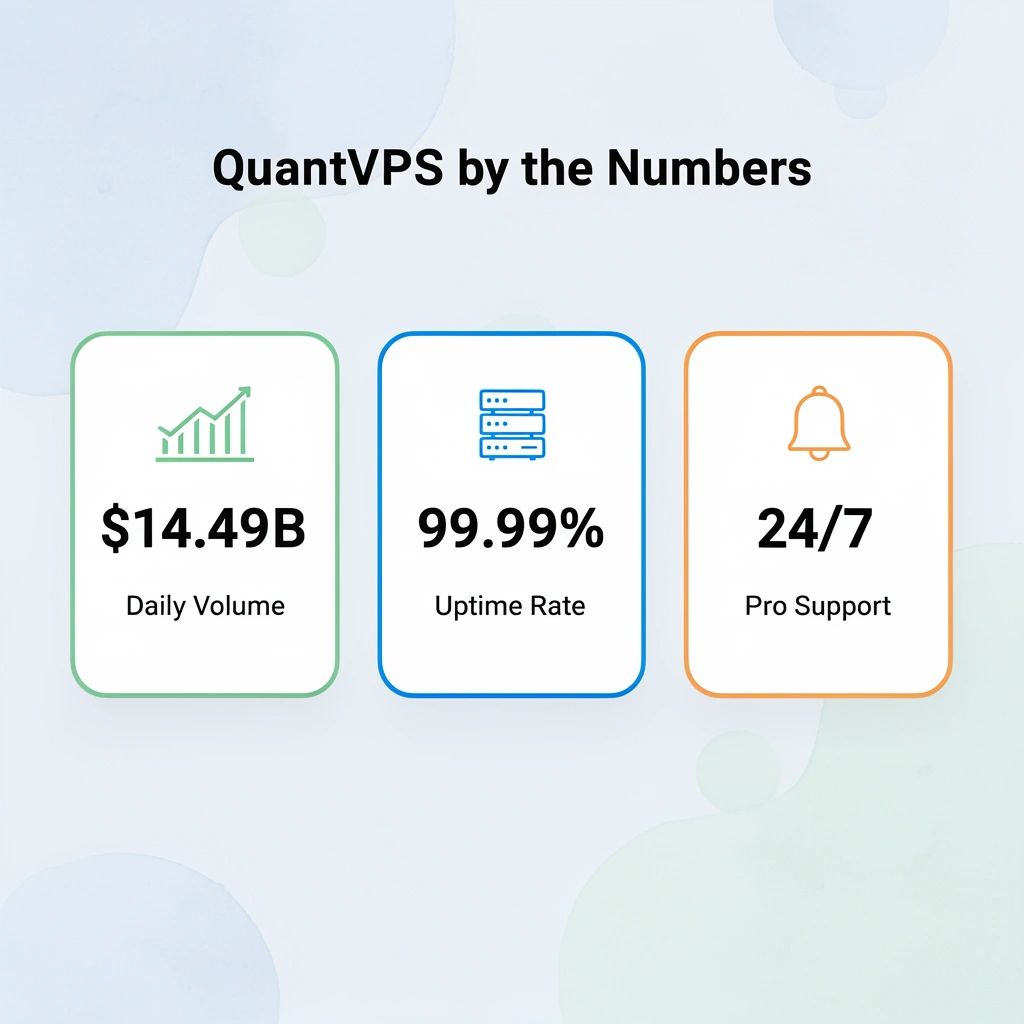
QuantVPS processes more than $14.49 billion in trades every single day, a volume that demonstrates the extraordinary level of trust professional traders place in a platform whose technology works reliably.
"QuantVPS processes more than $14.49 billion in trades every day, a volume that shows the trust professional traders give when technology works reliably." — QuantVPS Platform Data
🎯 Key Point: $14.49 billion in daily trade volume is a direct measure of trader confidence in QuantVPS's infrastructure reliability.
💡 Tip: When evaluating a VPS provider for trading, look at real transaction volume as your most critical trust signal—it reflects performance under live market conditions.
What makes the performance case concrete
ClearEdge Trading's independent review confirms 99.99% uptime across QuantVPS infrastructure. When your algorithm holds a futures position overnight, and a connectivity drop costs a full point of slippage, uptime becomes a financial variable, not a technical specification. The same review confirms sub-1ms latency to CME, placing QuantVPS in a category most general-purpose cloud providers cannot reach.
Why does infrastructure reliability affect live trading results?
Most traders start by running automated strategies on home computers or regular cloud servers. That works until a power outage during the London session open, internet slowdown at busy times, or a Windows update forces a restart mid-trade. Reliability issues compound, making it impossible to replicate backtest results in live trading. Traders who switch to a purpose-built trading VPS like QuantVPS find that real trading performance matches backtest assumptions much more closely, because the infrastructure is optimized specifically for trading stability and uptime.
Speed, slippage, and why 0.52ms changes the math
The 0.52ms direct link to CME Group matters little for casual traders but proves critical for scalpers and high-frequency strategies where milliseconds determine filled versus missed orders. Our QuantVPS infrastructure places servers in Chicago adjacent to the exchange, minimizing physical distance to the matching engine. Without third-party routing or extra steps, our setup treats time as a trader's most valuable resource.
Built for the full stack, not just one platform
The platform compatibility list covers over 20 trading environments, from NinjaTrader and TradeStation to Bookmap, Sierra Chart, Rithmic, and Tradovate. Serious traders rarely run a single platform: a futures scalper might use NinjaTrader for execution, Bookmap for order flow visualization, and Rithmic as their data feed simultaneously. QuantVPS handles that setup without forcing traders to choose between performance and compatibility. Accounts activate instantly after payment, eliminating the setup work that typically costs traders a full trading day.
What do Trustpilot ratings actually reveal about QuantVPS support?
Trustpilot ratings for QuantVPS are telling because the trading technology space gets a lot of complaints. Latency spikes, platform crashes, and unresponsive support are common problems with general hosting providers. When a provider gets strong ratings in that environment, it shows that our 24/7 expert support actually answers tickets about NinjaTrader crashes and latency debugging, not just generic documentation.
Whether QuantVPS holds up under the specific demands of prop firm-funded accounts is a more nuanced question than most traders expect.
Is QuantVPS Good for Prop Firm Trading?
Prop firm trading requires strict infrastructure: short evaluation windows and zero tolerance for connectivity failures during drawdowns. Our QuantVPS is built for this environment, delivering the low latency and reliability that challenge phases and funded accounts require from first trade to last.

Run 24/7 while you sleep. Keep bots, platforms, and trade copiers online on a dedicated VPS.
Low-latency VPS hosting for your trading platform.
 CHINYC
 LON
LONFrom $29.99/mo


 CHI/CME futuresNYC/US marketsLON/FX EAs
 DUB/Polymarket
 AMS/EU FX
 FRA/Central EU
 TYO/APAC crypto
"Prop firm evaluations leave zero room for error — a single connectivity failure during a drawdown can cost you your entire funded account." — QuantVPS Infrastructure Insight
🎯 Key Point: Prop firm traders face uniquely demanding conditions — evaluation windows are short, and any downtime or lag can mean an instant disqualification from a funded account.
⚠️ Warning: Using a standard home internet connection or low-grade hosting during a prop firm challenge phase is one of the most common — and most costly — mistakes traders make.
| Infrastructure Factor | Standard Setup | QuantVPS |
|---|---|---|
| Latency | High / Variable | Ultra-low, optimized |
| Uptime Reliability | Inconsistent | Enterprise-grade |
| Challenge Phase Ready | ❌ No | ✅ Yes |
| Funded Account Support | ❌ No | ✅ Yes |
| Connectivity Failure Risk | High | Minimal |
✅ Best Practice: Choose a VPS solution purpose-built for prop firm environments — one that guarantees low latency and consistent uptime across every stage of your trading journey, from evaluation to funded account.

Why latency matters more in prop firm accounts
The failure point in most prop firm setups is not the strategy—it's the gap between signal and execution. When a scalping bot fires an order, and the fill comes back 40 milliseconds late, the entry price has already moved. In a prop firm account with tight daily loss limits, that slippage compounds fast. According to ClearEdge Trading's 2026 QuantVPS review, QuantVPS delivers sub-1ms latency to CME, meaning the distance between your bot's decision and the exchange's confirmation is measured in fractions of a millisecond rather than the seconds that plague home machines or generic cloud setups.
Most traders running prop firm evaluations start with a local desktop or shared cloud server. That works until internet problems during high-volume opens cause platform freezes mid-position, triggering daily loss limits from uncontrolled slippage rather than poor trades. Our QuantVPS trading VPS plans support 24/7 bot operation, multi-monitor configurations, and simultaneous backtesting without resource contention, helping you maintain consistent execution when it matters most.
Can automated bots run continuously on QuantVPS?
Yes. The VPS Ultra and Dedicated plans support high-frequency trading bots running around the clock, with NinjaTrader, MetaTrader, and similar platforms pre-configured. This matters because prop firm challenge phases do not pause for system reboots. ClearEdge Trading confirms 99.99% uptime, translating to roughly 52 minutes of downtime per year, making unplanned disconnections a statistical anomaly rather than a monthly expectation.
What separates a funded trader from a failed evaluation is operational consistency: the same conditions, execution environment, and latency profile on day one and day thirty. Our QuantVPS trading solution eliminates variables a home setup cannot control: power outages, ISP throttling, and hardware failures during live market hours.
Account Setup Steps
Registration Process
Head over to quantvps.com and click on "Sign Up." Provide your email, contact details, and create a strong password. After signing up, check your email for a confirmation link (it may take up to 24 hours). Click the link to verify your account, and you're ready to select a plan that matches your trading needs.
Selecting a Plan
QuantVPS offers four plans tailored to different trading volumes. Here's a quick overview:
| Plan | Trading Capacity | Best For | Monthly Cost |
|---|---|---|---|
| VPS Lite | 1-2 charts | Beginners | $49/month |
| VPS Pro | 3-5 charts | Active traders | $99/month |
| VPS Ultra | 5-7 charts | Professional traders | $199/month |
| Dedicated Server | 7+ charts | Trading firms | $299/month |
When deciding on a plan, think about:
- How many charts you'll run simultaneously
- Your monitor setup and display needs
- The processing power required for your trading strategies
- Storage space for historical data
Payment and Activation
Choose your preferred billing cycle and add any upgrades you might need, like extra storage or RAM. Payments can be made securely via credit card or wire transfer. Once you've reviewed and accepted the service agreement, your VPS will be set up quickly. Connection details will be sent to your email.
For enterprise setups, a QuantVPS specialist will reach out to help with custom configurations and migration support, ensuring everything runs smoothly.
VPS Connection Guide
Remote Desktop Setup
Choose the right remote desktop client based on your operating system:
- Windows users: Use the built-in Remote Desktop Connection (RDC) client.
- macOS users: Download Microsoft Remote Desktop from the App Store.
- Mobile users: Install the RD Client app on iOS or Android devices.
Set up your connection with these recommended settings:
| Setting | Recommended Value | Purpose |
|---|---|---|
| Display | Native Resolution | Provides clear chart visibility |
| Performance | Balanced | Balances latency and quality |
| Network | Auto-detect | Adjusts to your connection speed |
| Audio | Disabled | Saves bandwidth |
Access Credentials
Your VPS credentials will be sent via email within 30 minutes. These include:
- VPS IP address
- Username
- Temporary password
- RDP port number
Tip: Change your temporary password immediately after your first login. You can also find your credentials in the QuantVPS client portal under 'VPS Settings > Connection Details.'
Connection Steps
-
Launch the Remote Desktop Client
- On Windows, open the RDC client (type 'mstsc' in the search bar).
- On macOS, open Microsoft Remote Desktop.
- For mobile devices, open the RD Client app.
-
Enter Connection Details
- Input your VPS IP address, username, and RDP port (if it’s not set to the default).
-
Adjust Display Settings
- Match the resolution to your monitor for the best visual experience.
- Enable all monitors if using multiple screens.
- Set the color depth to 32-bit for sharp and clear charts.
Troubleshooting Connection Issues
If you face connection problems, try the following:
- Ensure your internet speed is at least 5 Mbps.
- Check your firewall settings.
- Verify that the RDP port is not blocked.
- Use the IP address instead of the hostname if needed.
For users on VPS Pro plans or higher, multi-monitor setups are supported. Inside your remote session, click the "Display Settings" icon and select "Extend these displays" to activate additional screens. The system will automatically detect and configure your monitors for an organized trading workspace.
Once connected, you can proceed to configure your trading platform for an optimized VPS experience.
QuantVPS: Client Portal Tour & Guide to Access Your Server ...
Stay online and closer to execution. Choose a VPS location for CME futures, New York markets, London FX, API trading, and more.
Host your platform near the market route that matters.
CHINYCLONFrom $29.99/mo
CHI/CME futuresNYC/US marketsLON/FX EAsDUB/PolymarketAMS/EU FXFRA/Central EUTYO/APAC cryptoTrading Platform Setup
Once your VPS is set up and connected, the next step is installing and configuring your trading platform to ensure smooth and efficient operation.
Platform Installation
QuantVPS is designed to work seamlessly with Windows Server 2022 and supports widely-used trading platforms. Here's how to get started:
- NinjaTrader: Download the latest version and install it using the default settings to ensure charts display properly.
- MetaTrader: Obtain the installation package from your broker, follow the default installation process, and adhere to any security recommendations provided.
- TradeStation: Use the standard setup process and take advantage of NVMe storage for better performance.
Once installation is complete, you can proceed to fine-tune your VPS for optimal performance.
Optimizing VPS Performance
After installing your platform, tweak performance settings to prioritize key tasks and manage memory usage. Keep an eye on system performance during heavy trading periods to identify any potential bottlenecks.
Configuring Market Data and Broker Connections
Ensure your data feed and broker connections are stable. Adjust data feed settings based on your broker's instructions and activate two-factor authentication to enhance security.
Resource Allocation Guidelines
Use the table below to allocate resources effectively based on your trading needs:
| Number of Charts | Recommended RAM | CPU Cores | Storage |
|---|---|---|---|
| 1-2 | 8GB | 4 cores | 70GB |
| 3-5 | 16GB | 6 cores | 150GB |
| 5-7 | 64GB | 24 cores | 500GB |
| 7+ | 128GB | 16+ cores | 2TB+ |
Keep at least 25% of resources free to handle sudden spikes during periods of high market activity.
VPS Management Guide
Keep your QuantVPS server in top shape to ensure smooth trading operations.
Regular Maintenance
Weekly Tasks:
- Install Windows Server updates during non-trading hours.
- Clear temporary files and browser cache.
- Check system logs for any unusual activity.
- Confirm that backups have completed successfully.
Monthly Tasks:
- Update your trading platform software.
- Test disaster recovery procedures to ensure readiness.
- Analyze resource usage trends for potential adjustments.
Schedule critical updates during off-hours, such as 12:00 AM–4:00 AM EST on Saturdays, to minimize disruptions. Always monitor updates to quickly address any issues.
Performance Monitoring
Track these key metrics to keep your VPS running efficiently:
| Metric | Target Range | Action if Exceeded |
|---|---|---|
| CPU Usage | Below 75% | Upgrade your plan or optimize running applications. |
| RAM Usage | Below 80% | Close unused charts or increase memory allocation. |
| Network Latency | 0–1ms | Contact support for network optimizations. |
| Disk Usage | Below 85% | Archive old files or expand storage capacity. |
Use Windows Performance Monitor to track these metrics in real time. Set alerts to catch potential performance issues before they impact trading.
Security Guidelines
In addition to regular maintenance and monitoring, prioritize these security practices:
Access Control:
- Activate the Windows Defender firewall.
- Limit remote desktop access to specific IP addresses.
- Use strong passwords with at least 12 characters.
- Enable two-factor authentication for logging into your VPS.
Network Security:
- Keep DDoS protection active.
- Review connection logs daily for suspicious activity.
- Close unnecessary ports to reduce vulnerabilities.
- Use encrypted connections for all remote access.
Data Protection:
- Set up automatic backups to safeguard your data.
- Encrypt sensitive trading information.
- Store login credentials securely.
- Create system restore points before making major changes.
For Windows Server 2022, configure the built-in security baseline settings to align with QuantVPS recommendations. This ensures compatibility with trading platforms while providing strong protection against common threats.
Conclusion
Summary
QuantVPS delivers ultra-low latency (0–1 ms) and 100% uptime, making it a solid choice for futures and forex trading. It supports reliable execution on major platforms like NinjaTrader, MetaTrader, and TradeStation.
Here’s what stands out:
- Fast Infrastructure: NVMe storage and dedicated cores ensure quick execution speeds.
- Trader-Friendly Features: Multi-monitor support (in select plans) and compatibility with various platforms simplify your trading setup.
- Strong Security: Built-in DDoS protection and automatic backups keep your operations secure.
- Scalable Options: Plans range from 4 cores/8 GB RAM to configurations with 16+ cores/128 GB RAM, catering to different needs.
Follow these steps to get started with your trading setup.
Next Steps
-
Select a Plan
- Options range from VPS Lite ($49/month for 1–2 charts) to Dedicated Server ($299/month for 7+ charts).
-
Set Up Your System
- Install your preferred trading platform.
- Configure Windows Server security settings.
- Enable automated backups.
- Test connection speeds with your broker.
-
Boost Performance
- Use Windows Performance Monitor to track system metrics.
- Schedule maintenance during off-hours (12:00 AM–4:00 AM EST).
- Keep your trading software and system up to date.
- Follow the security guidelines provided in this guide.
For tailored advice, reach out to QuantVPS support to optimize your trading environment.


